CCCD Chip Reading and Verification via NFC
This document highlights the CCCD Chip Reading and Verification via NFC details.
Objective
The CCCD Chip Reading and Verification via NFC module extracts user information from the chip embedded in CCCD National ID(NID) card (or a Citizen ID card) and validates it against the national database.
Near-field communication (NFC) is a short-range wireless technology that aides communication between NFC-enabled devices in close proximity to each other.
| Input | Output |
|---|---|
| The following values associated with the user's NID: • ID Number • Date of Birth • Date of Expiry | The user's Personally identifiable information (PII) extracted from the national database, the associated verification status and the suggested action for the identity verification process. You can find the details of all the output fields under the success response details section. |
Prerequisites
- iOS
- Android
Permissions
-
Add
Privacy - NFC Scan Usage Descriptionkey in theInfo.Plistfile. -
Add the following reader key in the
Info.Plistfile:
<key>com.apple.developer.nfc.readersession.iso7816.select-identifiers</key>
<array>
   <string>com.apple.developer.nfc.readersession.iso7816.select-identifiers</string>
   <string>A0000002471001</string>
   <string>00000000000000</string>
</array>
- Under the
Signing & Capabilitiestab fromxcodeproj, click on the + Capability button and add Near Field Communication capability
Permissions
Add the following permission under the AndroidManifest.xml file:
<uses-feature
        android:name="android.hardware.nfc"
        android:required="true" />

<uses-permission android:name="android.permission.NFC" />
Integration
Add the following line of code to the build.gradle file along with HyperKYC:
implementation ("co.hyperverge:hvnfc-sdk:2.1.0")
Inputs
The following table provides the details of the input parameters required for the module:
| Parameter | Mandatory or Optional | Data Type | Accepted Values | Description |
|---|---|---|---|---|
| idNumber | Mandatory | string | A valid Vietnamese citizen identification number | The twelve digit identification number of the user |
| dateOfBirth | Mandatory | string | Format: DD-MM-YYYY | The date of birth of the user |
| dateOfExpiry | Mandatory | string | Not applicable | The date of expiry of the user's identity card |
Success Responses
The following section presents the successful responses generated by the module:
- Read Only
- Read and Verify
The following is a success response returned when the Read Only configuration parameter for the module is set to true:
{
  "status": "success",
  "statusCode": "200",
  "metaData": {
    "requestId": "<Request_ID>",
    "transactionId": "<Transaction_ID>"
  },
  "result": {
    "details": {
      "status": 200,
      "requestId": "<Request_ID>",
      "citizenId": "<Masked_Citizen_ID>",
      "oldCitizenId": "<Masked_Old_Citizen_ID>",
      "fullName": "<Full_Name>",
      "dateOfBirth": "<Date_Of_Birth_in_DD-MM-YYYY_Format>",
      "dateOfIssue": "<Date_Of_Issue_in_DD-MM-YYYY_Format>",
      "dateOfExpiry": "<Date_Of_Expiry_in_DD-MM-YYYY_Format>",
      "gender": "<Gender>",
      "nationality": "<Nationality>",
      "ethnicity": "<Ethnicity>",
      "religion": "<Religion>",
      "placeOfOrigin": "<Place_Of_Origin>",
      "placeOfResidence": "<Place_Of_Residence>",
      "personalIdentification": "<Personal_Identification>",
      "fatherName": "<Father_Name>",
      "motherName": "<Mother_Name>",
      "partnerName": "<Partner_Name>",
      "mrz": "<MRZ_Code>",
      "faceImage": "<Base64_Encoded_Face_Image>",
      "vendorSignature": "<Base64_Encoded_Vendor_Signature>"
    },
    "summary": {
      "action": "pass",
      "details": []
    }
  }
}
The following is a success response returned when the Read Only configuration parameter for the module is set to false:
{
  "status": "success",
  "statusCode": "200",
  "metaData": {
    "requestId": "<Request_ID>",
    "transactionId": "<Transaction_ID>"
  },
  "result": {
    "details": {
      "status": 200,
      "requestId": "<Request_ID>",
      "verifyRequestId": "<Verify_Request_ID>",
      "citizenId": "<Masked_Citizen_ID>",
      "oldCitizenId": "<Masked_Old_Citizen_ID>",
      "fullName": "<Full_Name>",
      "dateOfBirth": "<Date_Of_Birth_in_DD-MM-YYYY_Format>",
      "dateOfIssue": "<Date_Of_Issue_in_DD-MM-YYYY_Format>",
      "dateOfExpiry": "<Date_Of_Expiry_in_DD-MM-YYYY_Format>",
      "gender": "<Gender>",
      "nationality": "<Nationality>",
      "ethnicity": "<Ethnicity>",
      "religion": "<Religion>",
      "placeOfOrigin": "<Place_Of_Origin>",
      "placeOfResidence": "<Place_Of_Residence>",
      "personalIdentification": "<Personal_Identification>",
      "fatherName": "<Father_Name>",
      "motherName": "<Mother_Name>",
      "partnerName": "<Partner_Name>",
      "mrz": "<MRZ_Code>",
      "faceImage": "<Base64_Encoded_Face_Image>",
      "vendorSignature": "<Base64_Encoded_Vendor_Signature>"
    },
    "summary": {
      "action": "pass",
      "details": []
    }
  }
}
Success Response Details
- Read Only
- Read And Verify
The following table provides the details of the fields in a success response when the module has a Read Only configuration:
| Field | Type | Description |
|---|---|---|
| status | number | The status of the request. |
| requestId | string | The request identifier for HyperVerge's internal reference |
| citizenId | string | The user's 12-digit National Identification Number (NID). |
| oldCitizenId | string | The user's old 9-digit National Identification Number (NID). |
| fullName | string | The user's complete name (Vietnamese). |
| dateOfBirth | string | The date of birth in the format dd-mm-yyyy. |
| dateOfIssue | string | The date of issue in the format dd-mm-yyyy. |
| dateOfExpiry | string | The date of expiry in the format dd-mm-yyyy. |
| gender | string | The user's gender (M: Male, F: Female). |
| nationality | string | The user's nationality(default: Việt Nam). |
| ethnicity | string | The user's ethnicity from the 64 ethnic groups in Vietnam. |
| religion | string | The user's religion. |
| placeOfOrigin | string | The user's hometown. |
| placeOfResidence | string | The user's living address at the time of registration. |
| personalIdentification | string | A personal mark of identity. |
| fatherName | string | The full name of the user's father. |
| motherName | string | The full name of the user's mother. |
| partnerName | string | The full name of the user's spouse. |
| faceImage | base64 | The image on the Vietnam National Identification Document (NID). |
| mrz | string | The MRZ code of the individual's document |
| vendorSignature | string | The base64-encoded vendor signature |
In addition to the fields present in a success response for a Read Only configuration, a success response for the Read and Verify configuration contains the following fields:
| Parameter | Type | Description |
|---|---|---|
| verifyC06 | boolean | The verification status (true/false) of the user details against the national database. |
| vendorSignature | string | The base64-encoded vendor signature |
| vendorVerifySignature | string | The base64-encoded vendor verification signature |
| c06VerifySignature | string | The base64-encoded C06 verification signature |
Summary Object
The following table provides the details of the summary object relevant to both the Read and the Read and Verify configurations.
| Object | Field | Expected Values | Description |
|---|---|---|---|
| summary | action |
|
You can find the sample responses corresponding to each of the actions under the Actions section. |
| details | The relevant code and message field-value pairs | The "details" array consists of the code and message fields in case of an error response. |
Actions
The following are codes corresponding to each type of action value supported by the module.
- Pass
- Fail
- Manual Review
This is the response where the application is approved for further processing.
{
  "summary": {
    "action": "pass",
    "details": []
  }
}
This is the response where the application is rejected.
{
  "summary": {
    "action": "fail",
    "details": [
      {
        "code": "001",
        "message": "Missing input(s)"
      }
    ]
  }
}
This is the response where the application is sent to manual review.
{
  "summary": {
    "action": "manualReview",
    "details": [
      {
        "code": "001",
        "message": "Missing input(s)"
      }
    ]
  }
}
Error Responses
The following section contains error responses generated by the module.
- Missing Parameter(s)
- NFC Read Failure
- External Server Downtime
{
  "status": "failure",
  "statusCode": 400,
  "metaData": {
    "requestId": "<Request_Identifier>",
    "transactionId": "<Transaction_Identifier>"
  },
  "result": {
    "summary": {
      "action": "manualReview",
      "details": [
        {
          "code": "001",
          "message": "Missing parameter(s)"
        }
      ]
    },
    "error": "Missing parameter(s)"
  }
}
{
  "status": "failure",
  "statusCode": 422,
  "metaData": {
    "requestId": "<Request_Identifier>",
    "transactionId": "<Transaction_Identifier>"
  },
  "result": {
    "summary": {
      "action": "manualReview",
      "details": [
        {
          "code": "020",
          "message": "Data Integrity check failed"
        }
      ]
    },
    "error": "Data Integrity check failed"
  }
}
{
  "statusCode": 503,
  "status": "failure",
  "message": "External source downtime",
  "error": "EXTERNAL_DOWNTIME"
}
Error Response Details
An error response from the module contains a failure status, with a relevant code and error message.
The following table lists all the error responses.
| Status Code | Error Code | Message | Description |
|---|---|---|---|
| 400 | 001 | Missing parameter(s) | The request has at least one missing input. Please contact the HyperVerge team for resolution |
| 503 | 002 | External source downtime | The external vendor system is temporarily unavailable. Please try again later |
| 503 | 003 | External source downtime | The external vendor system is temporarily unavailable. Please try again later |
| 503 | 004 | External source downtime | The external vendor system is temporarily unavailable. Please try again later |
| 503 | 005 | External source downtime | The external vendor system is temporarily unavailable. Please try again later |
| 503 | 006 | External source downtime | The external vendor system is temporarily unavailable. Please try again later |
| 503 | 007 | External source downtime | The external vendor system is temporarily unavailable. Please try again later |
| 503 | 008 | External source downtime | The external vendor system is temporarily unavailable. Please try again later |
| 503 | 009 | External source downtime | The external vendor system is temporarily unavailable. Please try again later |
| 400 | 010 | Duplicated data in unique field | Duplicate values were found in a field expected to be unique. Check the input and resubmit |
| 422 | 011 | Request ID mismatch for C06 validation - No data found | The provided Request ID does not match any existing records. Verify and resubmit the correct Request ID |
| 503 | 012 | External source downtime | The external vendor system is temporarily unavailable. Please try again later |
| 503 | 013 | External source downtime | The external vendor system is temporarily unavailable. Please try again later |
| 422 | 014 | Not found transaction (recheck) | The requested transaction was not found. Verify the transaction details and try again |
| 503 | 015 | External source downtime | The external vendor system is temporarily unavailable. Please try again later |
| 422 | 016 | Source API has no corresponding card data in the system | The API could not find any matching card data for the provided input |
| 503 | 017 | External source downtime | The external vendor system is temporarily unavailable. Please try again later |
| 503 | 018 | External source downtime | The external vendor system is temporarily unavailable. Please try again later |
| 500 | Internal Server Error | An unexpected error occurred on the server. Please contact the HyperVerge team for support | |
| 422 | 020 | Data integrity check failed | Invalid NFC data (SOD, COM, DGxx) |
| 429 | Rate limit error | Too many requests were made in a short period. The limit is 200 requests per minute | |
| 106 | NFC permission denied | Permission to use NFC not granted | |
| 120 | NFC not detected on this device | NFC not present/detected in the device | |
| 121 | Authentication Failure | Could not read due to invalid chip | |
| 122 | Card got disconnected | Connection disconnected with chip during scanning | |
| 125 | Incomplete scan | OS returns success scan status, but the data is incomplete. Available on SDK version ≥ 0.31.0 |
Application View
The following section showcases screens from a sample application featuring the CCCD Chip Reading and Verification via NFC module, accessible within the Applications tab of the HyperVerge dashboard.
- Read
- Read and Verify
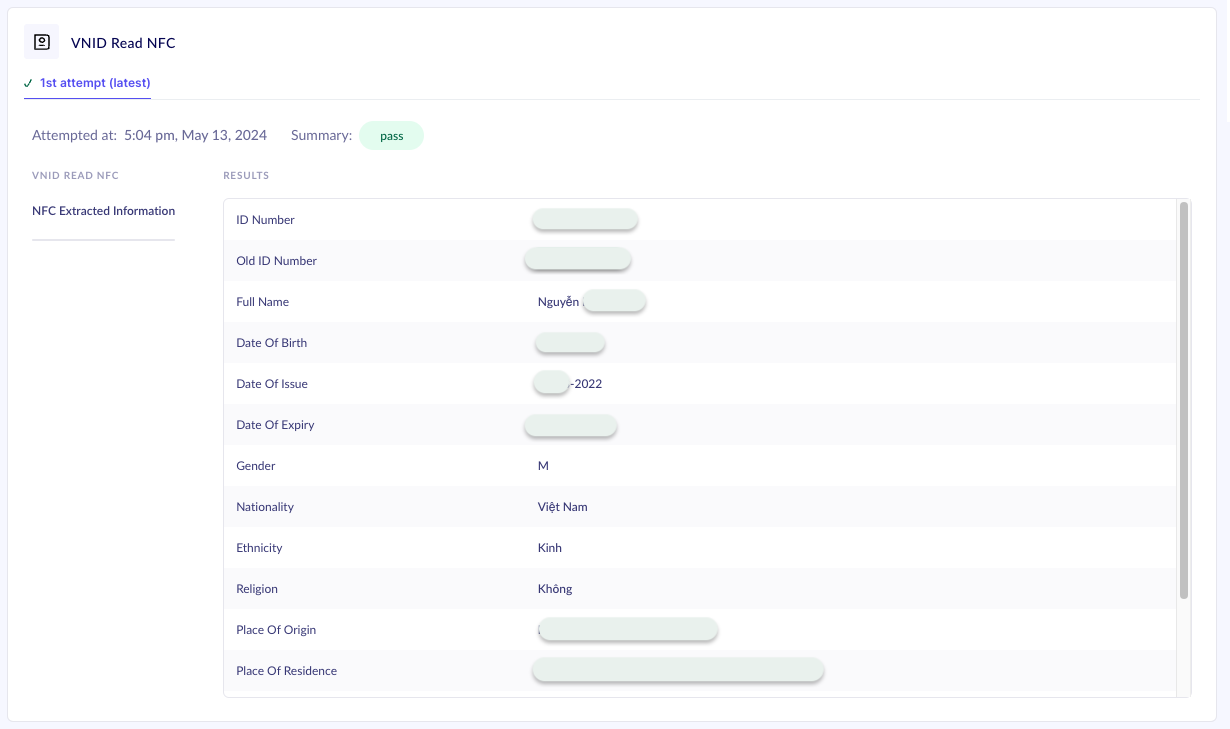
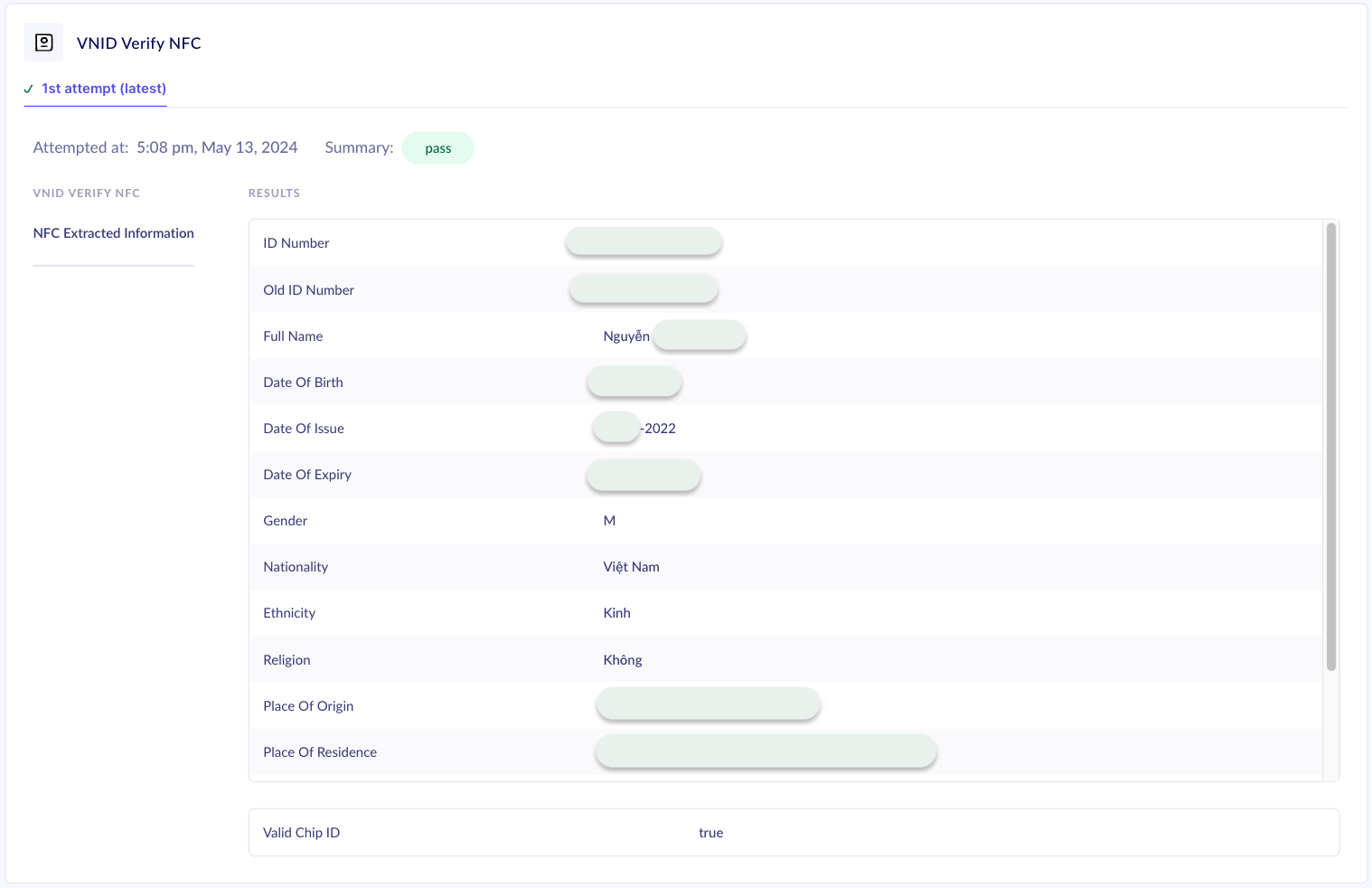
- The image only contains some of the output fields for representation. Please refer the success response details section for the complete list of supported fields.
- The PII in the image has been masked for representation purposes.