Geolocation from IP
Description
Objective
The Geolocation from IP module accepts an IP address and responds with the geolocation details.
| Input | Output |
|---|---|
| User's IP address | The geolocation and network details, such as:
|
Input
The following table provides the complete information on all the input parameters for the module.
| Parameter | Description | Mandatory or Optional | Allowed Values | Default Value |
|---|---|---|---|---|
ip | The IP address for verification | Optional | Not Applicable | The public IP* address of the end user's system |
*A Public IP is assigned by your Internet Service Provider (ISP) and is visible on the internet, allowing the module to fetch location data.
In contrast, Private IPs are used within local networks, for example, at home or in an office and cannot be used to retrieve such details, as they are not visible on the public internet.
Success Response
{
  "status": "success",
  "statusCode": "200",
  "metadata": {
    "requestId": "<Unique_Request_ID>",
    "transactionId": "<Transaction_ID>"
  },
  "result": {
    "workflowDetails": {
      "workflowId": "<Workflow_ID>",
      "version": 1
    },
    "applicationStatus": "auto_approved",
    "results": [
      {
        "module": "Geolocation From IP",
        "moduleId": "module_kzPEG0_ip_geolocation_api",
        "apiResponse": {
          "status": "success",
          "statusCode": "200",
          "metadata": {
            "requestId": "<Unique_Request_ID_For_IP>",
            "transactionId": "<Transaction_ID_For_IP>"
          },
          "result": {
            "ipAddress": "<IP_Address>",
            "geoDetails": {
              "as": "<Autonomous_System>",
              "city": "<City>",
              "country": "<Country>",
              "countryCode": "<Country_Code>",
              "isp": "<Internet_Service_Provider>",
              "lat": "<Latitude>",
              "lon": "<Longitude>",
              "org": "<Organization>",
              "query": "<Query_IP_Address>",
              "region": "<Region_Code>",
              "regionName": "<Region_Name>",
              "status": "success",
              "timezone": "<Timezone>",
              "zip": "<Zip_Code>"
            },
            "summary": {
              "action": "pass",
              "details": []
            }
          }
        },
        "attempts": "<Number_of_Attempts>",
        "previousAttempts": []
      }
    ]
  }
}
Success Response Details
| Parameter | Type | Description |
|---|---|---|
| workflowId | string | The unique ID of the workflow |
| version | integer | The version number of the workflow |
| applicationStatus | string | The status of the application |
| results | array | An array of results for the request |
| module | string | The name of the module being executed |
| moduleId | string | The ID of the module |
| apiResponse | object | Contains the API response details |
| status | string | The status of the API response |
| statusCode | string | The status code of the API response |
| metadata | object | Contains metadata information for the API response |
| requestId | string | A unique identifier for the API request |
| transactionId | string | A unique identifier for the API transaction |
| result | object | Contains the result of the API response |
| ipAddress | string | The IP address being queried |
| geoDetails | object | Geolocation details based on the IP address |
| as | string | The autonomous system's name and number associated with the IP |
| city | string | The city associated with the IP |
| country | string | The country associated with the IP |
| countryCode | string | The country code associated with the IP |
| isp | string | The internet service provider for the IP address |
| lat | float | The latitude of the location for the IP |
| lon | float | The longitude of the location for the IP |
| org | string | The organization associated with the IP |
| query | string | The queried IP address |
| region | string | The region code for the location |
| regionName | string | The name of the region |
| status | string | The status of the geolocation query |
| timezone | string | The timezone of the location for the IP |
| zip | string | The zip code of the location for the IP |
| summary | object | A summary of the geolocation result |
| action | string | The action taken based on the geolocation query result |
| details | array | An array of detailed actions and codes related to the query result |
| attempts | string | The number of attempts made to retrieve the geolocation details |
| previousAttempts | array | An array containing information on previous attempts |
Failure Response
{
  "module": "Geolocation From IP",
  "moduleId": "module_kzPEG0_ip_geolocation_api",
  "apiResponse": {
    "status": "failure",
    "statusCode": "400",
    "metadata": {
      "requestId": "<Request_ID>",
      "transactionId": "<Transaction_ID>"
    },
    "result": {
      "error": "Unable to locate geoIp",
      "summary": {
        "action": "fail",
        "details": [
          {
            "code": "136",
            "message": "Unable to locate geoIp"
          }
        ]
      }
    }
  }
}
Error Response
The following is a sample response for a server error.
- Internal Server Error
{
  "status": "failure",
  "statusCode": "500",
  "error": {
      "message": "Internal Server Error"
  }
}
Failure and Error Response Details
failure status with a relavant status code and error message.
The following table lists all error responses. | Status Code | Error Message | Error Description |
|---|---|---|
| 400 | Unable to locate geoIp | Geolocation details could not be fetched due to invalid or unresolvable IP |
| 500 | Internal Server Error | There is an error with HyperVerge's server. Kindly contact the HyperVerge team for resolution. |
| 503 | Server Busy | Please contact the HyperVerge team for resolution |
Application View
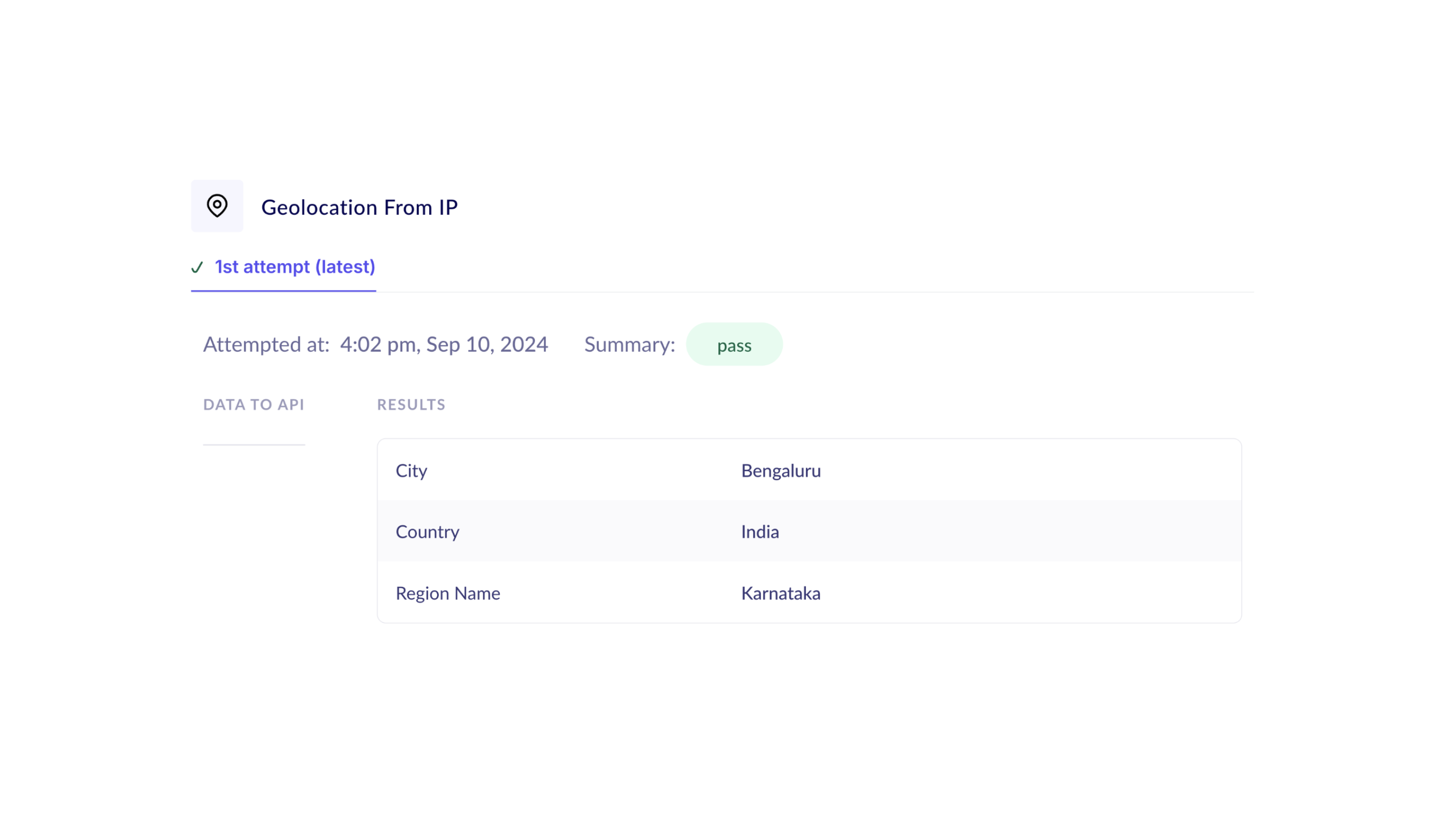
The following image shows the information about the Video OTP module for a sample application available under the Applications tab of the HyperVerge dashboard.
Application Details
The application view presents the geolocation data, based on the queried IP address and displays the results. The set of information displayed in the application view is configurable.
The following table describes the fields available in an application view.
| Field Name | Description |
|---|---|
| Attempted At | The timestamp of the verification process |
| Summary | If the field value is "pass," it indicates that the application has passed all the configured checks in the module. Otherwise, it reflects a "fail" value. |
| Results | This field represents the geolocation data returned from the IP address. It can include data points such as City, Country,Region Name, ZIP Code, or any set of information, from the results that the module returns. The data seen in an application view can be configured as per the requirements. |