Educational Certificate OCR API
The following document highlights the details of the Educational Certificate OCR API.
API Description
Objective
The Educational Certificate OCR API processes marksheet images and returns candidate information, examination details, and subject-wise marks for 10th and 12th standard marksheets.
| Input | Output |
|---|---|
| An image of a 10th or 12th standard marksheet | The extracted candidate information, examination details, and subject-wise marks. The complete list of output fields is available in the Success Response Details section. |
API URL
https://ind-engine.thomas.hyperverge.co/v1/readEducationCertificate
API Endpoint
readEducationCertificate
Overview
The Educational Certificate OCR API is RESTful and uses standard HTTP verbs and status codes. The responses are in JSON format and you should upload all images and files as form-data through a POST request.
Authentication
You need a unique pair of application ID (appid) and application key (appkey) from HyperVerge to verify your identity for accessing the Educational Certificate OCR API.
Method - POST
Headers
| Parameter | Mandatory or Optional | Description | Allowed Values |
|---|---|---|---|
| content-type | Mandatory | This parameter defines the media type for the request payload | multipart/form-data |
| appid | Mandatory | The application identifier shared by HyperVerge. You can find the details in the dashboard's credentials tab. | This should be a unique value. |
| appkey | Mandatory | The application key shared by HyperVerge. You can find the details in the dashboard's credentials tab. | This should be a unique value. |
| transactionId | Optional | A unique identifier for tracking a user journey | This should be both unique and easily associated with the user's journey in your application(s) |
Inputs
The following table outlines the parameters required in the Educational Certificate OCR API's request body:
| Parameter | Mandatory / Optional | Type | Description | Input Format | Default Value |
|---|---|---|---|---|---|
image | Mandatory | file | The educational certificate or marksheet image file to be processed | Image file (JPEG, JPG, or PNG) with a maximum size of 6MB, or a PDF file | Not Applicable |
- When multiple images are included in a single API request, only one image is processed. Ensure that each API call contains a single image.
- For PDF files with multiple pages, only the first page is processed for OCR extraction.
Request
The following code snippet demonstrates a standard curl request for the Educational Certificate OCR API:
curl --location --request POST 'https://ind-engine.thomas.hyperverge.co/v1/readEducationCertificate' \
--header 'appid: <Enter_the_App_ID>' \
--header 'appkey: <Enter_the_App_Key>' \
--header 'transactionId: <Enter_the_Transaction_ID>' \
--form 'image=@"<Enter_the_File_Path>"'
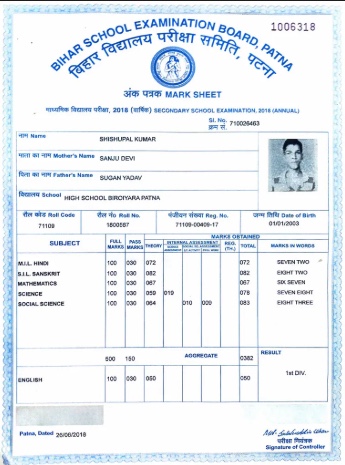
Document Sample
The following is a sample educational certificate processed by the API:
Success Response
The following JSON code snippet demonstrates a success response from the Educational Certificate OCR API:
{
    "status": "success",
    "statusCode": 200,
    "result": {
        "details": [
            {
                "fieldsExtracted": {
                    "examinationName": {
                        "value": "<Examination_Name>"
                    },
                    "boardOrUniversityName": {
                        "value": "<Board_Or_University_Name>"
                    },
                    "candidateName": {
                        "value": "<Candidate_Name>"
                    },
                    "studentRollNumber": {
                        "value": "<Student_Roll_Number>"
                    },
                    "dateOfBirth": {
                        "value": "<Date_Of_Birth>"
                    },
                    "guardianName": {
                        "value": "<Guardian_Name>"
                    },
                    "yearOfPassing": {
                        "value": "<Year_Of_Passing>"
                    },
                    "marksObtained": {
                        "value": [
                            {
                                "subjectName": "<Subject_Name>",
                                "marksInWords": "<Marks_In_Words>",
                                "marksInFigures": "<Marks_In_Figures>"
                            },
                            {
                                "subjectName": "<Subject_Name>",
                                "marksInWords": "<Marks_In_Words>",
                                "marksInFigures": "<Marks_In_Figures>"
                            }
                        ]
                    },
                    "totalMarksObtained": {
                        "value": "<Total_Marks_Obtained>"
                    },
                    "result": {
                        "value": "<Result_Division>"
                    }
                },
                "type": "Mark Sheet"
            }
        ]
    },
    "metadata": {
        "requestId": "<Request_ID>"
    }
}
Success Response Details
The following table outlines the details of the success response from the Educational Certificate OCR API:
| Parameter | Type | Description |
|---|---|---|
| status | string | The status of the request |
| statusCode | integer | The HTTP status code returned by the Educational Certificate OCR API |
| result.details | array | The list of extracted document information objects, one per detected document |
| type | string | The type of the detected document (e.g., Mark Sheet) |
| examinationName | string | The name of the examination (e.g., Secondary School Examination, Higher Secondary Final Examination) |
| boardOrUniversityName | string | The name of the educational board or university that conducted the examination |
| candidateName | string | The full name of the student or candidate |
| studentRollNumber | string | The roll number assigned to the student for the examination |
| dateOfBirth | string | The date of birth of the candidate |
| guardianName | string | The name of the parent or guardian of the candidate |
| yearOfPassing | string | The year in which the candidate passed the examination |
| marksObtained | array | The subject-wise breakdown of marks, containing one object per subject |
| marksObtained[].subjectName | string | The name of the subject |
| marksObtained[].marksInWords | string | The marks obtained in the subject expressed in words (may be empty) |
| marksObtained[].marksInFigures | string | The marks obtained in the subject expressed as numeric figures |
| totalMarksObtained | string | The total marks obtained by the candidate across all subjects |
| result | string | The final result or division awarded to the candidate (e.g., 1ST DIV., Pass with First Division) |
| metadata.requestId | string | The unique request identifier provided in metadata |
Error Responses
The following are the error responses from the Educational Certificate OCR API:
- Invalid/Missing Image
- File Too Large
- Missing/Invalid Credentials
- Document Not Detected
- Internal Server Error
{
    "message": "Input Validation Error: Invalid input passed for field 'image'",
    "statusCode": 400,
    "status": "failure"
}
{
    "message": "File too large",
    "statusCode": 400,
    "status": "failure"
}
{
    "message": "Missing/Invalid credentials",
    "statusCode": 401,
    "status": "failure"
}
{
    "status": "failure",
    "statusCode": 422,
    "result": {
        "error": "Document Not Detected"
    },
    "metadata": {
        "requestId": "<Request_ID>"
    }
}
{
    "status": "failure",
    "statusCode": 500,
    "message": "Internal Server Error"
}
Error Response Details
failure status, with a relevant status code and error message. The following table lists all error responses: | Status Code | Error Message | Error Description | Error Resolution |
|---|---|---|---|
| 400 | Input Validation Error: Invalid input passed for field 'image' | The image parameter is missing or contains an invalid value | Ensure the image field is present and contains a valid image file in the request body |
| 400 | File too large | The uploaded image file exceeds the maximum allowed size of 6MB | Compress or resize the image to ensure it is under 6MB before uploading |
| 401 | Missing/Invalid credentials | The request is missing the mandatory appid and appkey combination or has invalid values | Verify and provide valid credentials from the dashboard's credentials tab |
| 422 | Document Not Detected | No valid educational document was detected in the provided image | Ensure the uploaded image contains a clear and valid 10th or 12th standard marksheet |
| 500 | Internal Server Error | An unexpected error occurred on the server | Check the request headers or contact the HyperVerge team for resolution |