Death Certificate OCR API
The following document highlights the details of the Death Certificate OCR API.
API Description
Objective
The Death Certificate OCR API extracts key information from images of death certificates including,
- The name of the deceased,
- The place of death,
- The date of death,
- The registration date,
- The registration number.
| Input | Output |
|---|---|
| The image of the Death Certificate document | The key information extracted from the Death Certificate database using the OCR |
Next Step
Retrieve the complete death certificate information of the deceased through the Death Certificate DB Validation API.
API URL
https://ind-engine.thomas.hyperverge.co/v1/readDeathCertificate
API Endpoint
readDeathCertificate
Overview
The Death Certificate OCR API is RESTful and uses standard HTTP verbs and status codes. The responses are in JSON format, and you should upload all images and files as form-data through a POST request.
Method - POST
Authentication
You need a unique pair of application ID ( appId ) and application key ( appKey ) from HyperVerge to verify your identity for accessing the Death Certificate OCR API.
Headers
| Header | Mandatory / Optional | Description | Input Format |
|---|---|---|---|
| content-type | Mandatory | This parameter defines the media type for the request payload | multipart/form-data |
| appId | Mandatory | The application identifier shared by HyperVerge. You can find the details in the dashboard's credentials tab | This should be a unique value |
| appKey | Mandatory | The application key shared by HyperVerge. You can find the details in the dashboard's credentials tab | This should be a unique value |
| transactionId | Mandatory | Unique ID for the customer journey | Any defined unique value mapped to a transaction in your business ecosystem |
Inputs
- The text in the image should be legible for the product to extract information from an image successfully.
- A high image size leads to high uploading and processing time. The size of image should be reduced as much as possible while ensuring that prior condition is met.
- General guideline: Set the width of the ID card image to at least 800 pixels and the JPEG compression quality factor above 80%.
- The aspect ratio of the input image should be the same as the aspect ratio of the original document. Please verify the aspect ratio when resizing the image.
- The HyperVerge SDK provides the camera functionality for capturing images of ID cards while considering all the aforementioned requirements.
The following table provides the details of the parameters required for the Death Certificate OCR API's request body:
| Parameter | Mandatory / Optional | Type | Description | Input Format | Default Value |
|---|---|---|---|---|---|
image | Mandatory | file | The image file on which the Death Certificate OCR API will perform the OCR extraction. Note The Death Certificate OCR API supports JPEG, PNG and TIFF images. | Image file (JPEG, PNG, or TIFF) | Not Applicable |
project | Optional | string | The project identifier for the Death Certificate OCR API. This value must be hard-coded as "646b7cf6bd661c00239e7309" in your implementation | 646b7cf6bd661c00239e7309 | Not Applicable |
Request
The following code snippet demonstrates a standard curl request for the Death Certificate OCR API:
curl --location --request POST 'https://ind-engine.thomas.hyperverge.co/v1/readDeathCertificate' \
--header 'Content-Type: multipart/form-data' \
--header 'appId: <Enter_the_HyperVerge_appId>' \
--header 'appKey: <Enter_the_HyperVerge_appKey>' \
--header 'transactionId: <Enter_the_HyperVerge_transactionID>' \
--form 'image=@"<Enter_image_path_with_extension>"' \
--form 'project="646b7cf6bd661c00239e7309"'
Document Sample
The following is a sample of a death certificate document:
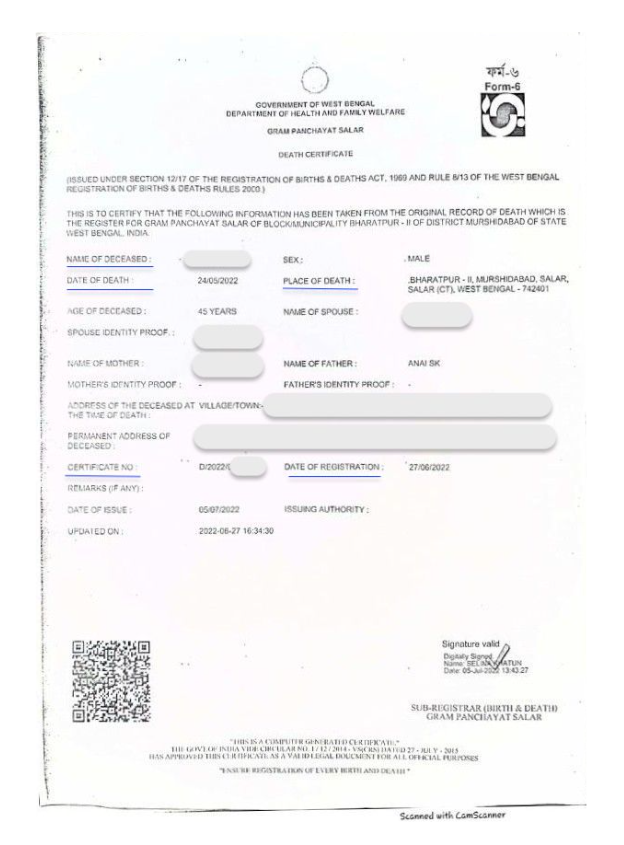
Some of the personally identifiable information (PII) in the sample have been intentionally obscured.
Success Response
The following code snippet demonstrates a success response from the Death Certificate OCR API:
{
  "status": "success",
  "statusCode": "200",
  "result": [
    {
      "details": {
        "name": {
          "value": "<Name_of_deceased>",
          "conf": 1,
          "to-be-reviewed": "no"
        },
        "place": {
          "value": "<Address>",
          "conf": 0.49,
          "to-be-reviewed": "yes"
        },
        "date": {
          "value": "24/05/2022",
          "conf": 1,
          "to-be-reviewed": "no"
        },
        "date_registration": {
          "value": "27/06/2022",
          "conf": 1,
          "to-be-reviewed": "no"
        },
        "registration_number": {
          "value": "<Registration_Number>",
          "conf": 0.93,
          "to-be-reviewed": "no"
        }
      },
      "type": "dv_v0.2"
    }
  ]
}
Success Response Details
The following table outlines the details of the success response from the Death Certificate OCR API:
| Parameter | Type | Description |
|---|---|---|
status | string | The status of the request |
statusCode | string | The HTTP status code for the response |
result | array | The JSON array containing the extracted death certificate details |
name | object | The name of the deceased individual |
place | object | The address of the fatal incident |
date | object | The date of the death |
date_registration | object | The date of certificate registration |
registration_number | object | The registration number (or certificate number) of the death certificate |
Failure Response
The following code snippet demonstrates a failure response from the Death Certificate OCR API:
{
    "status": "failure",
    "statusCode": 422,
    "error": "No Document detected",
    "requestId": "xxxxxxxxxxxxxxxx"
}
Error Responses
The following are some error responses from the Death Certificate OCR API:
- Missing Input Image
- Multiple Input Images
- Image Size Issue
- No Document Detected
- Internal Server Error
{
    "status": "failure",
    "statusCode": "400",
    "error": "API call requires one input image",
    "requestId": "xxxxxxxxxxxxxxxx"
}
{
    "status": "failure",
    "statusCode": "400",
    "error": "API call handles only one input image",
    "requestId": "xxxxxxxxxxxxxxxx"
}
{
    "status": "failure",
    "statusCode": "400",
    "error": "image size cannot be greater than 12MB",
    "requestId": "xxxxxxxxxxxxxxxx"
}
{
    "status": "failure",
    "statusCode": 422,
    "error": "No Document detected",
    "requestId": "xxxxxxxxxxxxxxxx"
}
{
    "statusCode": 500,
    "status": "failure",
    "error": "Internal Server Error"
}
Error Response Details
A failure or error response contains a failure status with a relevant status code and error message.
The following table lists all error responses:
| Status Code | Error Message | Error Description | Error Resolution |
|---|---|---|---|
| 400 | API call requires one input image | The request missed the image input | Ensure the request includes the image parameter with a valid image file |
| 400 | API call handles only one input image | The request had more than one image file input. The Death Certificate OCR API expects only one file in the request | Ensure the request includes only one image file |
| 400 | image size cannot be greater than 12MB | The image size is larger than the allowed limit | Reduce the image size to be less than 12MB while maintaining image quality |
| 422 | No Document detected | The Death Certificate OCR API failed to detect a document in the image. Ensure that the image captures the document following the guidelines mentioned under the Input Image Constraints section | Ensure the image clearly captures the death certificate document following the input image constraints |
| 500 | Internal Server Error | There was an error with HyperVerge's server. Please contact the HyperVerge team. | Check the request headers or contact the HyperVerge team for resolution |