Sales PDF OCR API
This document outlines the details of the Sales PDF OCR API.
API Description
Objective
The Sales PDF OCR API extracts business critical fields from Sales PDF document and returns it in a JSON format.
| Input | Output |
|---|---|
| A file containing a Sales PDF document | The textual information extracted from the document |
API URL
The URL for the Sales PDF OCR API is:
https://usa-engine.thomas.hyperverge.co/v1/readMCASalesApplication
API Endpoint
The endpoint for the Sales PDF OCR API is:
readMCASalesApplication
Overview
The Sales PDF OCR API is RESTful and uses standard HTTP verbs and status codes. The requests are in form-data format and responses are in JSON format. You should upload all images and files as form-data through a POST request.
Authentication
You need a unique pair of application ID ( appId ) and application key (appKey) from HyperVerge to verify your identity for accessing the Sales PDF OCR API.
API Request Details
Method - POST
Headers
| Header | Mandatory / Optional | Description | Input Format |
|---|---|---|---|
content-type | Mandatory | This parameter defines the media type for the request payload. | multipart/form-data |
appId | Mandatory | The application identifier shared by HyperVerge. You can find the details in the dashboard's credentials tab. | Not Applicable - this is a unique value |
appKey | Mandatory | The application key shared by HyperVerge. You can find the details in the dashboard's credentials tab. | Not Applicable - this is a unique value |
transactionId | Mandatory | A unique identifier for tracking a user journey | Not Applicable - this should be both unique and easily associated with the user's journey in your application(s) |
Input
The following table provides the details of the parameters required for the Sales PDF OCR API's request body:
| Parameter | Mandatory / Optional | Type | Description | Input Format | Default Value |
|---|---|---|---|---|---|
pdfFile | Mandatory | file | The file containing the Sales PDF document | Portable Document Format (PDF) | Not Applicable |
Request
The following code snippet demonstrates a standard curl request for the Sales PDF OCR API:
curl --location --request POST 'https://usa-engine.thomas.hyperverge.co/v1/readMCASalesApplication' \
--header 'Content-Type: multipart/form-data' \
--header 'appId: <Enter_the_HyperVerge_appId>' \
--header 'appKey: <Enter_the_HyperVerge_appKey>' \
--header 'transactionId: <Enter_the_HyperVerge_transactionID>' \
--form 'pdfFile=@"<path_to_pdf_file>"'
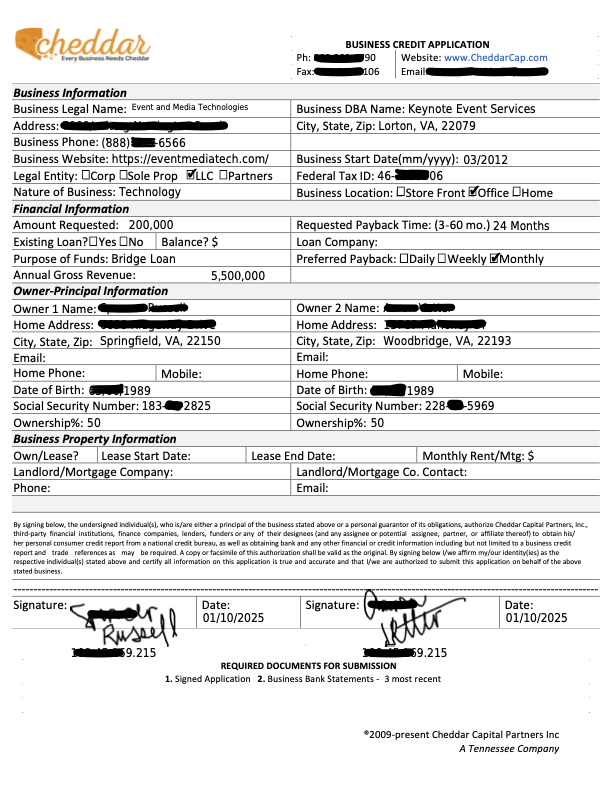
Document Sample
The following is a sample of a Sales PDF Document:
Success Response
The following code snippet demonstrates a success response from the Sales PDF OCR API:
{
"status": "success",
"statusCode": 200,
"result": {
"details": [
{
"fieldsExtracted": {
"businessLegalName": {
"value": "<Business_Legal_Name>",
"score": 1,
"confidence": "High"
},
"businessDBA": {
"value": "<Business_DBA_Name>",
"score": 1,
"confidence": "High"
},
"federalTaxID": {
"value": "<Federal_Tax_ID>",
"score": 1,
"confidence": "High"
},
"companyType": {
"value": "<Company_Type>",
"score": 1,
"confidence": "High"
},
"incorporationDate": {
"value": "<Incorporation_Date_in_MM/DD/YYYY_Format>",
"score": 1,
"confidence": "High"
},
"businessPhone": {
"value": "<Business_Phone_Number>",
"score": 1,
"confidence": "High"
},
"businessEmail": {
"value": "<Business_Email_Address>",
"score": 1,
"confidence": "High"
},
"businessAddress": {
"value": "<Business_Address>",
"score": 1,
"confidence": "High"
},
"businessLocationCity": {
"value": "<Business_City>",
"score": 1,
"confidence": "High"
},
"businessLocationState": {
"value": "<Business_State>",
"score": 1,
"confidence": "High"
},
"businessLocationZipCode": {
"value": "<Business_Zip_Code>",
"score": 1,
"confidence": "High"
},
"businessLocationCountry": {
"value": "<Business_Country>",
"score": 1,
"confidence": "High"
},
"businessDomainName": {
"value": "<Business_Domain_URL>",
"score": 1,
"confidence": "High"
},
"monthlyRevenue": {
"value": "<Monthly_Revenue>",
"score": 1,
"confidence": "High"
},
"annualRevenue": {
"value": "<Annual_Revenue>",
"score": 1,
"confidence": "High"
},
"amountRequested": {
"value": "<Amount_Requested>",
"score": 1,
"confidence": "High"
},
"useOfFunds": {
"value": "<Use_Of_Funds>",
"score": 1,
"confidence": "High"
},
"industryType": {
"value": "<Industry_Type>",
"score": 1,
"confidence": "High"
},
"ownerFirstName": {
"value": "<Owner_First_Name>",
"score": 1,
"confidence": "High"
},
"ownerLastName": {
"value": "<Owner_Last_Name>",
"score": 1,
"confidence": "High"
},
"ownerMobileNumber": {
"value": "<Owner_Mobile_Number>",
"score": 1,
"confidence": "High"
},
"ownerHomeNumber": {
"value": "<Owner_Home_Number>",
"score": 1,
"confidence": "High"
},
"ownerEmail": {
"value": "<Owner's_Email>",
"score": 1,
"confidence": "High"
},
"ownerSocialSecurityNumber": {
"value": "<Owner's_Social_Security_Number>",
"score": 1,
"confidence": "High"
},
"ownerDateOfBirth": {
"value": "<Owner's_Date_Of_Birth_in_MM/DD/YYYY_Format>",
"score": 1,
"confidence": "High"
},
"ownershipPercentage": {
"value": "<Owner's_Percentage_Ownership>",
"score": 1,
"confidence": "High"
},
"ownerAddress": {
"value": "<Owner's_Address>",
"score": 1,
"confidence": "High"
},
"ownerResidenceCity": {
"value": "<Owner's_City>",
"score": 1,
"confidence": "High"
},
"ownerResidenceState": {
"value": "<Owner's_State>",
"score": 1,
"confidence": "High"
},
"ownerResidenceZipCode": {
"value": "<Owner's_Zip_Code>",
"score": 1,
"confidence": "High"
},
"ownerResidenceCountry": {
"value": "<Owner_Country>",
"score": 1,
"confidence": "High"
},
"owner2FirstName": {
"value": "<Second_Owner_First_Name>",
"score": 1,
"confidence": "High"
},
"owner2LastName": {
"value": "<Second_Owner_Last_Name>",
"score": 1,
"confidence": "High"
},
"owner2MobileNumber": {
"value": "<Second_Owner_Mobile_Number>",
"score": 1,
"confidence": "High"
},
"owner2HomeNumber": {
"value": "<Second_Owner_Home_Number>",
"score": 1,
"confidence": "High"
},
"owner2Email": {
"value": "<Second_Owner's_Email_Address>",
"score": 1,
"confidence": "High"
},
"owner2SocialSecurityNumber": {
"value": "<Second_Owner's_Social_Security_Number>",
"score": 1,
"confidence": "High"
},
"owner2DateOfBirth": {
"value": "<Second_Owner_Date_Of_Birth_in_MM/DD/YYYY_Format>",
"score": 1,
"confidence": "High"
},
"owner2OwnershipPercentage": {
"value": "<Second_Owner's_Partnership_Percentage>",
"score": 1,
"confidence": "High"
},
"owner2Address": {
"value": "<Second_Owner's_Address>",
"score": 1,
"confidence": "High"
},
"owner2ResidenceCity": {
"value": "<Second_Owner's_City>",
"score": 1,
"confidence": "High"
},
"owner2ResidenceState": {
"value": "<Second_Owner's_State>",
"score": 1,
"confidence": "High"
},
"owner2ResidenceZipCode": {
"value": "<Second_Owner's_Zip_Code>",
"score": 1,
"confidence": "High"
},
"owner2ResidenceCountry": {
"value": "<Second_Owner_Country>",
"score": 1,
"confidence": "High"
}
},
"signatureValidation": {
"validSignature": "<Valid_Signature_Status>",
"signatureType": "<Signature_Type>"
},
"type": "<Form_Type>"
}
],
"summary": {
"action": "<Summary_Action>",
"details": []
}
},
"metadata": {
"requestId": "<Request_ID>",
"transactionId": "<Transaction_ID>"
}
}
Success Response Details
The following table outlines the details of the success response from the Sales PDF OCR API:
| Parameter | Type | Description |
|---|---|---|
| status | string | Status of the Sales PDF OCR API response |
| statusCode | integer | The HTTP status code of the response |
| requestId | string | A unique identifier for the request |
| transactionId | string | A unique transaction identifier |
| type | string | The type of the form submitted (for example, Sales PDF) |
| validSignature | string | Indicates if the submitted signature is valid |
| signatureType | string | The type of signature used. It can be one of the following: docusign, digital with ip address, physical, or empty |
| businessLegalName | string | The registered legal name of the business |
| businessDBA | string | The 'Doing Business As' name of the business |
| federalTaxID | string | The Federal Tax Identification Number of the business |
| companyType | string | The type of business entity |
| businessPhone | string | The contact phone number of the business |
| businessEmail | string | The contact email address of the business |
| incorporationDate | string | The date the business was incorporated, in MM/DD/YYYY format |
| businessAddress | string | The registered address of the business |
| businessLocationCity | string | The city where the business is located |
| businessLocationState | string | The state where the business is located |
| businessLocationZipCode | string | The ZIP code of the business location |
| businessLocationCountry | string | The country where the business is located |
| businessDomainName | string | The website URL of the business |
| monthlyRevenue | string | The estimated monthly revenue of the business |
| annualRevenue | string | The estimated annual revenue of the business |
| amountRequested | string | The loan amount requested |
| useOfFunds | string | The intended use of the requested funds |
| industryType | string | The industry classification code of the business |
| ownerFirstName | string | The first name of the primary business owner |
| ownerLastName | string | The last name of the primary business owner |
| ownerMobileNumber | string | The mobile phone number of the primary business owner |
| ownerHomeNumber | string | The home phone number of the primary business owner |
| ownerEmail | string | The email address of the primary business owner |
| ownerSocialSecurityNumber | string | The Social Security Number of the primary business owner |
| ownerDateOfBirth | string | The date of birth of the primary business owner, in MM/DD/YYYY format |
| ownershipPercentage | string | The percentage of business ownership held by the primary owner |
| ownerAddress | string | The residential address of the primary business owner |
| ownerResidenceCity | string | The city of residence of the primary business owner |
| ownerResidenceState | string | The state of residence of the primary business owner |
| ownerResidenceZipCode | string | The ZIP code of the primary business owner's residence |
| ownerResidenceCountry | string | The country of residence of the primary business owner |
| owner2FirstName | string | The first name of the second business owner |
| owner2LastName | string | The last name of the second business owner |
| owner2MobileNumber | string | The mobile phone number of the second business owner |
| owner2HomeNumber | string | The home phone number of the second business owner |
| owner2Email | string | The contact email address of the second business owner |
| owner2SocialSecurityNumber | string | The social security number of the second business owner |
| owner2DateOfBirth | string | The date of birth of the second business owner, in MM/DD/YYYY format |
| owner2OwnershipPercentage | string | The percentage of business ownership held by the second owner |
| owner2Address | string | The residential address of the second business owner |
| owner2ResidenceCity | string | The city of the second business owner's residence |
| owner2ResidenceState | string | The state of the second business owner's residence |
| owner2ResidenceZipCode | string | The ZIP code of the second business owner's residence |
| owner2ResidenceCountry | string | The country of residence of the second business owner |
| summary | object | The summary object suggests the final action for the user's application. If the sample meets all verification criteria and can be processed without manual intervention, the summary.action field is set to "Pass". If the sample requires further review or manual verification, the summary.action field is set to "Manual_review". |
| action | string | The final decision or action taken based on the assessment |
Error Responses
The following are some error responses from the Sales PDF OCR API:
- Missing Input File
- Invalid File Type
- Incorrect Document Type
{
  "status": "failure",
  "statusCode": 400,
  "error": "Invalid input passed for field 'pdfFile'",
}
{
  "status": "failure",
  "statusCode": 400,
  "error": "Invalid file type for: 'pdfFile'",
}
{
  "status": "failure",
  "statusCode": 422,
  "error": "Document Not Detected",
  "metaData": {
      "requestId": "<Request_ID>",
        "transactionId": "<Transaction_ID>"
    }
}
Error Response Details
A failure or error response contains a failure status with a relevant status code and error message.
The following table lists all error responses:
| Status Code | Error Message | Error Description | Error Resolution |
|---|---|---|---|
| 400 | Invalid input passed for field 'pdfFile' | The input value is not a valid entry | Provide a valid file in the pdfFile field in the request body |
| 400 | Invalid file type for: 'pdfFile' | The input file type is invalid | Ensure the uploaded file is in Portable Document Format (PDF) |
| 422 | Document Not Detected | The input file in the request is not a valid Sales PDF document | Upload a valid Sales PDF document that matches the expected format |
| 500 | Internal Server Error | There was an error with HyperVerge's server. Please contact the HyperVerge team | Contact the HyperVerge team for resolution |